Dental clinic appointment software
Your clinic's pulse on one screen.
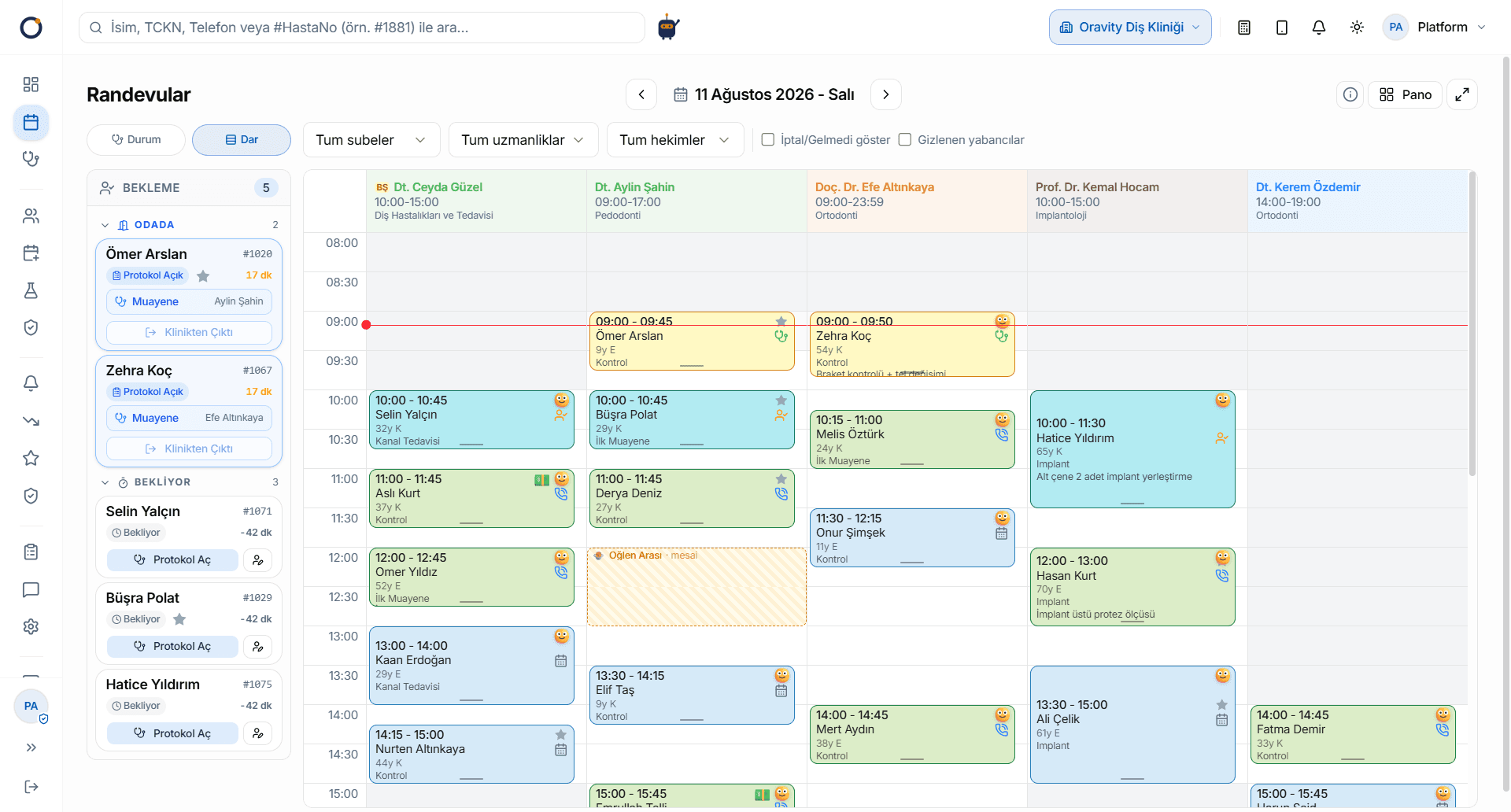
Add Break, Meeting, Call or Holiday to a provider's slots in one click. Track the in-clinic flow live in Calendar and Board views; log every step from booking to check-out and produce advanced analytics from status transitions.
What problem does it solve?
Monday, half past nine. The phone keeps ringing, two patients are sitting in the waiting room, and a dentist leans out of the treatment room to ask who's next. The appointment book shows two names in the same slot, and nobody knows who arrived first. Yesterday a patient who never got a reminder simply didn't turn up, and the chair sat empty for that hour. The team isn't the problem. The front desk, the waiting room and the treatment room just aren't looking at the same information. Good appointment software puts all three on one screen.
How it works
- 1Set up the calendarEach dentist gets their own column in the calendar. Add a break, meeting or holiday to a dentist's hours in one click, and the team can see why that time is taken.
- 2Book the appointmentBook into a free slot, and the system blocks a second appointment for the same dentist at the same time. If plans change, drag the patient to another time or another dentist.
- 3Send the reminderAn automatic SMS or email reminder goes out to the patient, along with an invite they can add to their own calendar.
- 4Follow the day liveEach patient moves through Scheduled, Arrived, In room and Completed, and the waiting panel shows who's waiting right now. The dentist calls the next patient from the screen, and everyone's view updates instantly.
- 5Learn from the recordEvery status change is logged, from the moment an appointment is booked until the patient leaves. The no-show, monthly appointment and appointment-and-patient analysis reports are built on that record.
Key capabilities
- Dentist columns sit side by side, so the front desk can see who is with which dentist without picking up the phone.
- Plan the day in Calendar view and follow the flow through the clinic live in Board view.
- Double-booking protection: the same dentist can't be booked twice for the same time.
- Drag and drop to change an appointment's time or dentist.
- When a status changes, every screen updates at once, with no need to refresh.
- Automatic SMS/email reminders, plus an appointment invite patients can add to their calendar.
- Through the Patient Portal, patients see past and upcoming appointments and can request a new one.
- Ready-made reports on no-shows, monthly appointments and SMS usage.
Frequently asked questions
Does the appointment software send SMS reminders?
Yes. Oravity sends appointment reminders automatically by SMS or email, and the patient also gets an invite they can add to their own calendar. That means fewer appointments missed simply because someone forgot.
How do you stop two appointments from landing in the same slot?
You don't need to do anything: Oravity itself blocks a second appointment for the same dentist at the same time. And because dentists' calendars sit side by side, you can see on the same screen which other dentist is free then.
How do I show a dentist's break or holiday on the calendar?
In Oravity, you add a Break, Meeting or Holiday to the relevant time on the dentist's calendar in one click. The front desk can then see why that time is taken and offer the patient another slot.
Will the software remind patients when a check-up is due?
Yes. With periodic recall, a patient whose treatment is finished drops onto the “To call” list automatically once the interval you set has passed, and a reminder goes out by SMS, email or WhatsApp. Nobody has to keep that list by hand.
Can patients book through the clinic's website themselves?
Yes, with the Online Booking module. You add the booking tool to your website with an embed code, and depending on your settings, requests either become appointments straight away or wait for your team's approval.