Dental charting and treatment plans
From dental chart to treatment plan — the whole process on record.
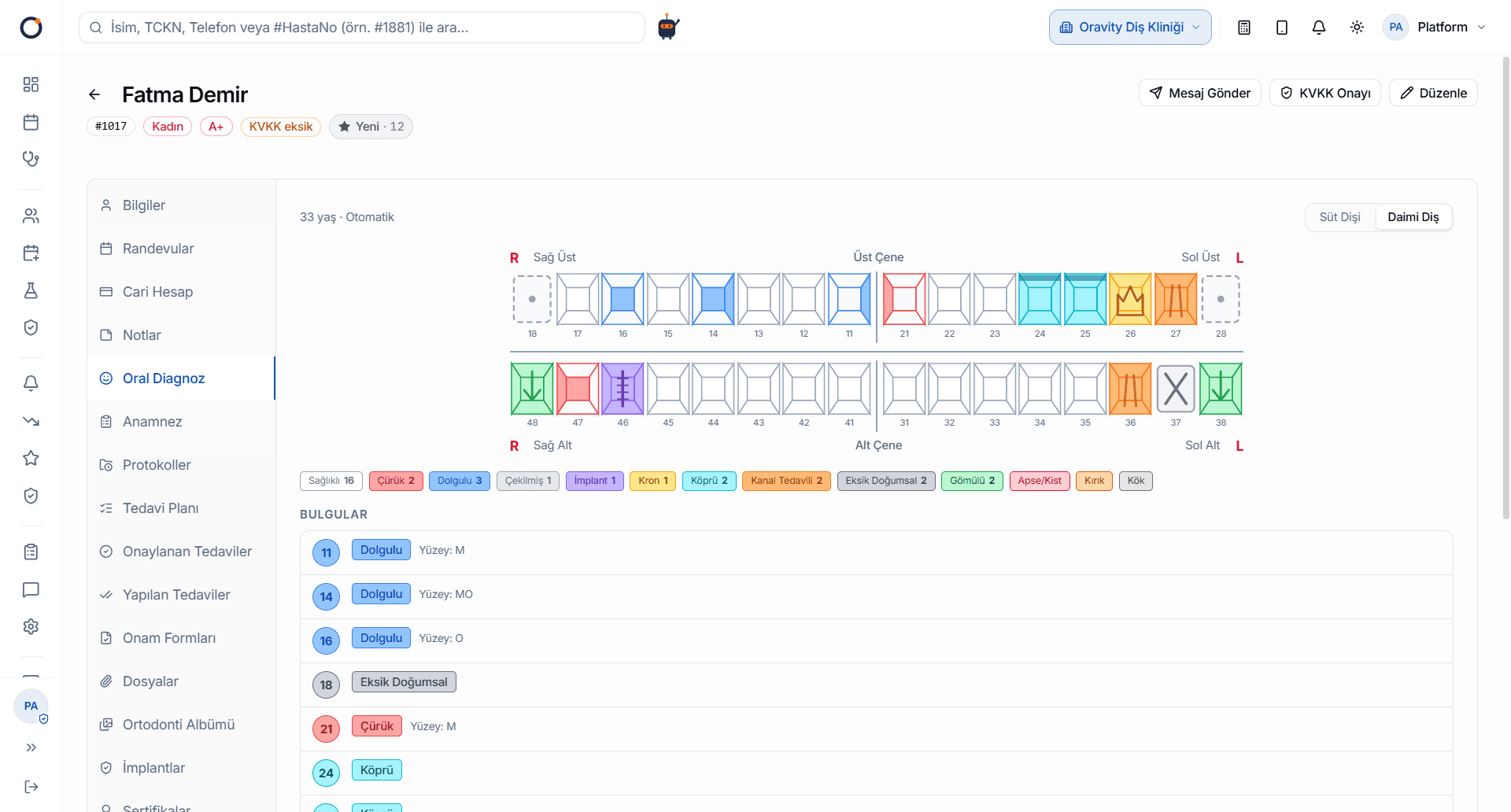
Record the patient's oral status on an interactive dental chart (odontogram) and build treatment plans from one screen. Anamnesis, findings, ICD diagnoses and treatment steps become traceable through the protocol flow. Integrated with the pricing engine, the price is calculated automatically whenever a treatment is selected.
What problem does it solve?
The patient is in the chair, mouth open. The dentist calls out decay on tooth 36, the assistant notes it on paper, and someone will type it into the system later. Three months on, the patient is back and the team is leafing through old notes to find out what was done on that tooth. The treatment plan lives in one file and the prices in another, so when the patient asks what it all comes to, out comes the calculator. Every gap between the exam and the plan costs time and opens the door to mistakes.
How it works
- 1History and findingsRecord the patient's medical history and exam findings, and enter ICD diagnoses in the same flow.
- 2Mark it on the chartThe whole mouth is on one screen. Click a tooth and mark its status, right down to the mesial, distal and occlusal surfaces when needed.
- 3Turn findings into a planEach finding you mark is suggested as a treatment-plan item. The moment you pick a treatment, the pricing engine calculates the price.
- 4Offer optionsPrepare scenarios for the same mouth, such as economy, standard and premium, side by side. When the patient chooses, one click makes that scenario the active plan, and the comparison can be handed over as a PDF.
- 5Follow it in the protocolTreatment steps are recorded in the protocol flow. Even months later, clicking a tooth lists every procedure done on it, with dates.
Key capabilities
- An interactive dental chart (odontogram) shows the whole mouth on one screen.
- Surface-level charting, with mesial, distal and occlusal surfaces marked separately.
- Primary-teeth mode: the chart switches to the primary dentition automatically based on the patient's age.
- Tooth history: click a tooth to see every procedure done on it, with dates.
- Medical history, exam findings and ICD diagnoses sit in the same patient record.
- Plans are tied to the pricing engine, so campaign and corporate discounts are applied automatically.
- When the scenario changes, completed work stays as it is and only items not yet done are updated.
- Patients can see their treatment plan and amounts on their own phone through the Patient Portal.
Frequently asked questions
What is a dental chart (odontogram)?
A dental chart is a visual record that shows every tooth by number and holds the status of each one. In Oravity you click a tooth and mark its status, and that entry flows straight into the treatment plan, the protocol and your reports.
Is there a separate chart for children's primary teeth?
Yes. In Oravity the chart switches to the primary dentition automatically based on the patient's age, so there's nothing extra to do for pediatric patients.
Can I give a patient more than one price option for the same treatment?
Yes. Put scenarios such as economy, standard and premium side by side and give the patient the comparison as a PDF. Once they decide, one click makes that scenario the active plan, and any work already done stays in place.
Where do the prices in a treatment plan come from?
They come from your clinic's own price list and the pricing rules you've set. As soon as you pick a treatment, the pricing engine works out the amount, so nobody has to look up a separate list and type prices in by hand.
How can I see what's been done on a tooth before?
Just click that tooth on Oravity's dental chart. Every procedure done on it is listed with its date.